JavaScript
DHTMLX Grid - JavaScript DataGrid (DataTable) Widget
Easily extensible JavaScript data grid for processing and managing datasets of any size and type at lightning speed to fit into web applications of any complexity and business realm.
Open a demo on desktop

DHTMLX Grid is a data-intensive UI widget by a renowned vendor
of JavaScript UI libraries,
which has helped thousands of companies develop top-notch web apps over the years.
which has helped thousands of companies develop top-notch web apps over the years.








DHTMLX Grid: from Prompt to Data Table in Minutes
DHTMLX Grid is available under GPL v2 via npm. Its consistent, well-documented API lets Claude, GitHub Copilot, and other AI coding assistants prototype a working data table faster.
Prompt
Run npm install @dhtmlx/grid and create a data grid with columns for product name, category, price, and stock. Enable sorting and filtering on all columns and load sample data from a local JSON array.
JS Grid with Real-Time Updates at Lightning Speed
DHTMLX Grid allows rendering 100,000+ rows in milliseconds. You can show the Chart widget from
DHTMLX Suite alongside the grid to visualize data changes and provide quick insights for your
end users.


 Angular
 Vue.js
 React
React
 NodeJS
Simplify Data Management with DHTMLX Grid

🧩 Attach a toolbar
Equip your Grid with a toolbar and put all the needed options for editing and managing data there.
Equip your Grid with a toolbar and put all the needed options for editing and managing data there.

Place filters in the header or footer of the grid or outside. Specify filtering criteria and set rules. Let users filter data using textarea, combobox, or drop-down list.
рџЋЁ Add custom content in cells
Apply templates to cells and tooltips to display the content of your choice and attach event handlers so that users can effortlessly interact with content.
Apply templates to cells and tooltips to display the content of your choice and attach event handlers so that users can effortlessly interact with content.

Define the columns and order of sorting and add sorting rules if needed.

Set the desired format via the format configuration option for:
- numeric values
- percentage values
- dates
вњЏпёЏ Create a menu with operations
Include essential grid operations in a drop-down menu attached to a cell.
Include essential grid operations in a drop-down menu attached to a cell.

Configure the Grid footer to show total values, set its height and style text.
Why Choose a JavaScript DataGrid by DHTMLX
Speedy with massive data
DHTMLX JavaScript Grid control is a full-featured DataGrid library that provides
cutting-edge functionality and works incredibly fast with immense data sets. DHTMLX
Grid can render 100,000+ rows in milliseconds in real time.
Adjustable to your needs
Due to an extensive JavaScript API, you can configure our HTML5 grid according to
your project requirements. You can use it as a simple data table or convert it
into a feature-packed versatile UI widget for complex enterprise-grade apps.
Fully customizable look & feel
DHTMLX Grid web control can conform to any design guidelines and behave the way
you need. CSS classes and HTML templates allow you to style all elements of the
JavaScript datagrid widget. Multiple event handlers help you control how it reacts
to user actions.
Excellent fit for any stack
No matter what frameworks you use, you can smoothly combine our JS data grid
library with any front-end and back-end technologies. To streamline this process,
you can benefit from ready-made code examples with popular frameworks - Angular,
React, and Vue.js.
Extensible feature set
Need more than just a grid control for data processing but also built-in
Excel-like formulas, multiple worksheets, and automatical aggregations and
pivoting? You can extend the DHTMLX Grid with the Spreadsheet and Pivot widgets,
coming in a bundle at a reduced cost.
Reinforce Your JS Data Table with Pivot
and Spreadsheet UI/UX

DHTMLX Grid Licensing
|
Individual
Total: $749
|
Commercial
Total: $1599
|
Enterprise
Total: $3199
|
Ultimate
Total: $6599
|
| License Terms | Read License Agreement | Read License Agreement | Read License Agreement | Read License Agreement |
| Developers | 1 | 5 | 20 | |
| Projects | 1 | 1 | 5 | |
| Use in SaaS (unlimited end-users) | ||||
| Source code | ||||
| Perpetual distribution rights |
|
Support Plan
|
Standard | Premium | Premium | Ultimate |
| Time Period | 1 year | 1 year | 1 year | 1 year |
| Updates | Major, minor, and maintenance updates | Major, minor, and maintenance updates | Major, minor, and maintenance updates |
Major, minor, and maintenance updates
Priority queue for bug fixing
|
| Support requests | 10 | 30 | 50 | |
| Response time | 72h | 48h | 48h | 24h |
| Personal Account Manager |
|
Functionality
|
PRO | PRO + 1 add-on | PRO + 2 add-ons | PRO + 3 add-ons |
| PRO features | ||||
| Online export to Excel | Free | Free | Free | Free |
| Free local Excel export module | ||||
| Online export to PDF/PNG without watermark | Free for 1 year | Free for 1 year | Free for 1 year | Free for 3 years |
| Free local PDF/PNG module |

DHTMLX Demos with JavaScript/HTML5 Grid

JavaScript DataGrid:
Frequently Asked Questions
General
Features
Performance
Integrations
Customization
Export and Import
General
What is DHTMLX Grid?
DHTMLX Grid is a powerful JavaScript data grid component designed for displaying, editing, and managing tabular data in web applications. It provides features such as sorting, filtering, grouping, drag-and-drop, and customizable columns through a rich JavaScript API. Developers can use it to create interactive data tables with advanced functionality and flexible configuration. The grid is part of the DHTMLX Suite UI library.
What is DHTMLX Grid used for?
DHTMLX Grid can be used to build data-driven interfaces in web applications. The JavaScript grid use cases include dashboards, admin panels, CRM systems, financial tools, and other enterprise web apps that require working with large datasets.
Is DHTMLX Grid free? Does it provide a trial period?
DHTMLX Grid is a commercial component. A free trial is available, allowing developers to evaluate the JavaScript data grid before purchasing a commercial license. The library is also available under a GPL license for open-source projects, which makes it a free JavaScript data grid option for non-commercial use.
How to install DHTMLX Grid?
To install a JavaScript data grid, you can add the package to your project and import the required files. For example, developers can install the Grid via npm and then import the component and styles into their application.
How to get started with DHTMLX Grid?
To start using DHTMLX Grid, create a container element in your page and initialize the component with a configuration object. In this configuration, you define columns, data sources, and features such as sorting or filtering. This setup makes JavaScript data grid getting started simple and developer-friendly. You can follow official documentation and online code snippets to accelerate implementation.
Does DHTMLX Grid support TypeScript?
DHTMLX Grid includes built-in TypeScript definitions that work out of the box, enabling type checking, autocompletion, and improved developer experience when working with the TypeScript data grid API.
What makes DHTMLX Grid a reliable choice for enterprise-grade applications?
Enterprise DataGrid solutions require stability, scalability, and long-term support, all of which are core strengths of DHTMLX Grid. Proven DHTMLX Grid reliability ensures consistent performance with large datasets, advanced features, and flexible customization. These qualities make it a decent choice for building complex enterprise applications with JavaScript Grid across diverse industries.
Does DHTMLX JavaScript DataGrid support AI data analysis features?
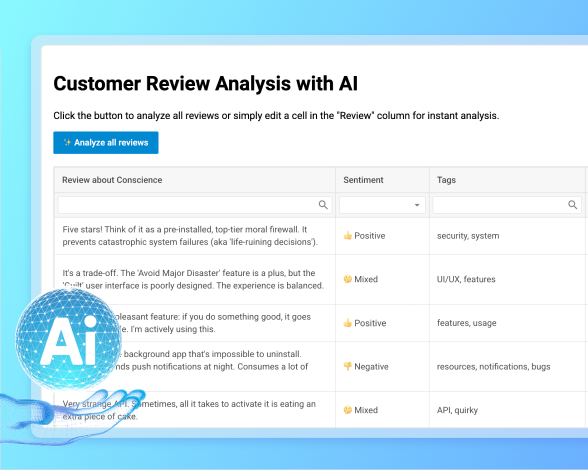
While not a native AI DataGrid, DHTMLX Grid can be combined with external machine learning integration tools for predictive analytics, automation, and intelligent data processing. In the AI Grid demo, the component processes customer reviews in real time: when a cell in the Review column is edited, the AI instantly detects sentiment, adds tags, and generates summaries. This flexibility shows how DHTMLX with AI analysis can be embedded into custom workflows to enhance decision-making and user experience.
Features
Does DHTMLX Grid support sorting and filtering?
Yes. DHTMLX Grid supports single- and multi-column sorting as well as flexible data filtering. You can filter data using text, select, combo, and date filters, including single-date and date-range filtering. You can also implement custom filtering logic for more advanced use cases.
Can I edit data directly in the grid?
DHTMLX Grid is an editable JavaScript grid that allows users to modify cell values directly. You can enable editing for the entire grid or specific columns through configuration settings, depending on your requirements. Editing can be controlled programmatically using methods, e.g., editCell() and editEnd(), to manage and save changes.
Does DHTMLX Grid support inline editing?
Yes. DHTMLX Grid allows users to edit cell values directly in the grid. Editing can be enabled for the entire grid or for specific columns, with support for different editor types such as text fields, selects, checkboxes, and date pickers. Developers can also manage editing programmatically and handle changes through the Grid API.
Does DHTMLX Grid support row grouping?
Yes. DHTMLX Grid allows users to group rows by column values and organize large datasets into expandable groups. Data can be grouped by multiple fields, while aggregated values and summary rows can be used to provide additional insights into grouped data.
Does it support a tree grid?
DHTMLX Grid includes a JavaScript tree grid mode for working with hierarchical data. You can organize rows into parent-child structures and expand or collapse branches directly in the grid. The TreeGrid mode also works with core features like editing, sorting, and selection.
Can I validate input data?
DHTMLX Grid includes built-in JavaScript grid validation to ensure accurate data entry. You can define validation rules and input masks for cells (numberMask and patternMask) that help enforce correct data formats and reduce user errors during data entry. Validation works seamlessly with inline editing and user interactions in the grid.
Is DHTMLX Grid accessible and does it support keyboard navigation?
Yes. DHTMLX Grid provides WAI-ARIA accessibility support and a comprehensive accessibility layer compliant with WCAG 2.2. It includes semantic grid and treegrid roles, ARIA attributes, screen reader support, and advanced keyboard navigation. Users can navigate between cells and Grid sections, select ranges, sort and filter data, and edit cells using keyboard controls.
Does DHTMLX Grid support Excel-like cell range selection and copy/paste?
Yes. DHTMLX Grid allows users to select cell ranges using a mouse, touch input, or keyboard navigation. The Clipboard module supports copying, cutting, and pasting selected data between cells, multiple grids, and external applications such as Microsoft Excel and Google Sheets.
Can I expand Grid rows and display nested content?
Yes. The Row Expander feature allows users to expand rows and display additional content in sub-rows. You can embed nested grids, forms, charts, other DHTMLX Suite components, or custom HTML. DHTMLX Grid also supports dynamically loaded sub-row content and multi-level Grid nesting.
Does DHTMLX Grid support undo and redo?
Yes. DHTMLX Grid PRO includes a History module for tracking user actions such as cell edits, clearing cells, and other changes. Users can undo and redo actions, while developers can manage the history stack programmatically through the Grid API.
Does DHTMLX Grid support drag-and-drop?
Yes. DHTMLX Grid supports drag-and-drop for rows and columns, including moving rows between grids and working with multiple selected rows. The DragPanel module provides additional controls for row movement, while TreeGrid allows developers to configure how dragged items are positioned within hierarchical data.
Does DHTMLX Grid support four-way frozen rows and columns?
Yes. DHTMLX Grid supports a four-way frozen layout, allowing you to freeze columns on both the left and right and rows at the top and bottom at the same time. Selection, resizing, copy/paste, and other Grid interactions continue to work consistently across frozen and scrollable areas. You can also configure the position of bottom-frozen rows and the Grid footer.
Performance
How does DHTMLX Grid handle large datasets?
DHTMLX Grid is optimized for working with large datasets and can render 100,000+ rows efficiently. Built-in virtualization renders only the visible part of the dataset, reducing DOM load and keeping scrolling responsive. Recent Grid updates also include performance and virtualization optimizations for large datasets. Lazy loading, pagination, and server-side data loading can be used to minimize the amount of data processed on the client.
How many rows can DHTMLX Grid render?
DHTMLX Grid is a high-performance data grid that can handle tens of thousands of rows efficiently. The exact number depends on configuration and browser performance, but the grid is optimized to render large datasets without significant slowdowns.
Does it support virtual scrolling?
The component supports JavaScript grid virtualization through built-in smart rendering. Only the rows currently visible in the viewport are rendered in the DOM, while the rest of the data is processed dynamically as users scroll. This approach reduces DOM load and improves performance when working with large datasets.
How to display large tables in JavaScript?
To display large tables in JavaScript, DHTMLX Grid provides built-in optimization features, including virtualization and efficient data rendering. You can configure the grid to load and display only the necessary data at a time. This approach ensures smooth scrolling and fast interaction even with large datasets.
How does DHTMLX Grid handle pagination with big data tables?
DHTMLX's pagination DataGrid support ensures smooth navigation across large datasets by combining smart rendering with a dedicated JavaScript Pagination widget. This component allows users to browse thousands of records efficiently using navigation buttons and an input field. Developers can set the page size and initial page and style it with custom CSS. With rich API methods and event listeners, large dataset pagination becomes fully customizable, making DHTMLX Grid a highly scalable JavaScript DataTable solution.
Does it support lazy loading?
Yes, DHTMLX Grid supports JavaScript grid lazy loading. Data can be loaded dynamically as users interact with the grid, instead of loading everything at once.
Is server-side processing supported?
DHTMLX Grid can be used as a server-side data grid by loading data from external sources via AJAX. It uses built-in data loading methods to send requests and retrieve data from backend APIs in formats like JSON. This approach allows you to manage large datasets efficiently and keep data synchronized with the server.
How to optimize grid performance?
To improve JavaScript table performance, DHTMLX includes such features as virtualization, lazy loading, and efficient rendering. You can also optimize performance by limiting the number of visible columns and using server-side operations. Proper configuration helps reduce DOM load and speeds up interactions.
Can it handle real-time data updates?
Yes, DHTMLX Grid can work as a real-time JavaScript grid with live data updates. You can implement a multi-user backend using WebSockets, allowing the client and server to exchange data instantly. The grid API supports getting, editing, deleting, and sending data, so updates can be reflected in real time without reloading.
Integrations
Can I integrate DHTMLX Grid with React?
DHTMLX Grid can be used as a React data grid. You can integrate it into React applications by initializing the grid inside components and managing lifecycle methods. The component works well with modern frontend frameworks and supports dynamic updates through its API. This makes it suitable for building interactive React-based data tables.
Does DHTMLX Grid support Angular?
You can use DHTMLX Grid as an Angular data grid by embedding it into Angular components. It can be initialized and controlled through lifecycle hooks, making it easy to manage data and events. The flexible API supports full customization within Angular applications.
Can I use DHTMLX Grid with Vue?
DHTMLX Grid is compatible with Vue and can function as a Vue data grid. You can easily initialize and manage the grid inside Vue components and react to data changes using Vue's reactivity system. The API allows flexible configuration and event handling.
Is Svelte supported?
Yes, DHTMLX Grid can be used as a Svelte data grid. It can be integrated into Svelte applications by initializing the grid inside a component and attaching it to a DOM element. You can manage the grid instance using Svelte lifecycle methods and update or destroy it when needed. This approach ensures smooth integration with Svelte's reactive component model.
Can I integrate it with Next.js?
You can build a NextJS data grid with DHTMLX. It runs on the client side and can be initialized within Next.js components after rendering, enabling dynamic and interactive data tables in your application. If you need assistance in integrating DHTMLX Grid with a required technology, you can always reach out to DHTMLX support.
How to connect DHTMLX Grid to REST API?
You can connect DHTMLX Grid to a JavaScript grid REST API using its built-in data loading and data saving capabilities. The grid can send requests to a backend and load data in formats like JSON, as well as handle create, update, and delete operations. It supports integration with backend services through standard HTTP requests, making it easy to synchronize client-side changes with the server.
Can it work with GraphQL?
You can use DHTMLX Grid to build a GraphQL data grid. We do not provide a built-in GraphQL integration; however, you can fetch data from a GraphQL API and pass it to the Grid component. If you need help integrating DHTMLX Grid with any technology, don't hesitate to reach out to DHTMLX support.
Is backend pagination supported?
DHTMLX Grid supports server-side pagination grid setups. You can implement pagination on the backend and load only the required data pages via AJAX.
Customization
Can I customize the grid appearance?
DHTMLX allows you to customize a JavaScript grid extensively. You can configure columns, adjust layout settings, and modify cell rendering to control how data is displayed. The grid also supports styling through CSS and built-in configuration options. This flexibility makes it easy to adapt both the appearance and behavior to your application design.
Does DHTMLX Grid support themes?
With DHTMLX Grid, you can apply different JavaScript grid themes with several predefined options, such as light, dark, and high-contrast themes. You can switch themes using configuration or the setTheme() method. For deeper customization, you can adjust CSS variables or use the built-in Theme Configurator to create and export custom styles.
Can I use conditional formatting?
DHTMLX supports conditional formatting in a JavaScript grid. You can apply styles to cells or rows dynamically by defining custom logic, for example, through templates or CSS classes based on data values. This allows you to control how specific data is displayed without changing the dataset itself.
Can I apply custom styles per row or cell?
You can easily customize JavaScript grid row style and cell-level styling. DHTMLX Grid allows assigning CSS classes to rows using the rowCss configuration or applying styles to cells via templates and custom markup. It also allows adding custom classes or elements inside cells for more precise control.
Can I customize cell content with templates and custom renderers?
Yes. DHTMLX Grid allows you to customize cell content using column templates and HTML. You can display formatted values, icons, buttons, images, checkboxes, and other custom elements based on row data. You can also attach event handlers to interactive elements inside custom cell templates.
Can I change column layouts dynamically?
You can set dynamic grid columns in JavaScript. DHTMLX Grid enables you to programmatically change column layouts by showing, hiding, reordering, or updating column configurations after initialization. The grid API allows you to modify column properties and structure at runtime based on user actions or application logic.
Can I add custom icons and buttons?
You can add custom JavaScript grid buttons and icons to cells. You can use column templates or custom rendering to insert HTML elements such as buttons or icons into cell content. These elements can trigger actions like editing, deleting, or navigation.
Does it support responsive layouts?
DHTMLX Grid supports responsive JavaScript grid behavior through flexible sizing configuration. You can control grid and column sizes using properties like width, height, and auto-sizing options. This allows the layout to adapt to different container sizes and screen resolutions. It helps ensure the grid displays correctly across various devices and layouts.
Can I localize DHTMLX Grid?
Yes. DHTMLX Grid supports localization of interface labels. Developers can provide translated strings and apply a custom locale to adapt the Grid interface to different languages.
Export and Import
Can I export grid data to Excel?
Yes, you can export a data grid to Excel using the xlsx() method. Excel export is enhanced with the Json2Excel library, supporting spans, number formats, dates, and column options for more accurate output. You can also configure file name, sheet name, and formatting via export settings.
Can I export to CSV and PDF?
Does DHTMLX Grid support data import?
DHTMLX Grid allows you to load data into the grid from external sources. You can import data to the JavaScript grid via JSON either when it's initialized (using the data config) or after creation by calling the load() method for external URLs or parse() for local JSON objects or arrays.
Can I import data from Excel?
To import Excel to a JavaScript grid, you should convert Excel data into JSON before loading it. You can use our open-source Excel2json converter and then load the resulting JSON into the Grid component.
Does DHTMLX Grid support server-side export for large datasets?
Yes. For PDF and PNG exports, DHTMLX Grid can use the default online export service or a custom local export service for PDF and PNG export. XLSX export uses a WebAssembly-based worker and can also be configured to use a locally hosted worker for Excel export. DHTMLX Grid additionally supports CSV export with configurable export settings.
Can I customize export templates?
Yes, you can create a custom grid export using exportConfig and exportStyles. These options allow you to control exported columns, formatting, themes, headers/footers, and styles for PDF or PNG output. Advanced configuration is available in the PRO version.